Wirt Slider: Lightweight, Fast, and Easy-to-Use Gutenberg slider plugin
Author: Rostyslav Wirt
Table of content:
If you’re looking for a fast, flexible, and easy-to-use slider for WordPress Gutenberg editor, Wirt Slider is the perfect choice. Designed to be lightweight, it doesn’t bloat your website or slow down page load times, while still providing all the essential features for creating stunning sliders. With Wirt Slider, adding a modern slider to your posts, pages, or custom post types is as simple as dragging a block in the Gutenberg editor.
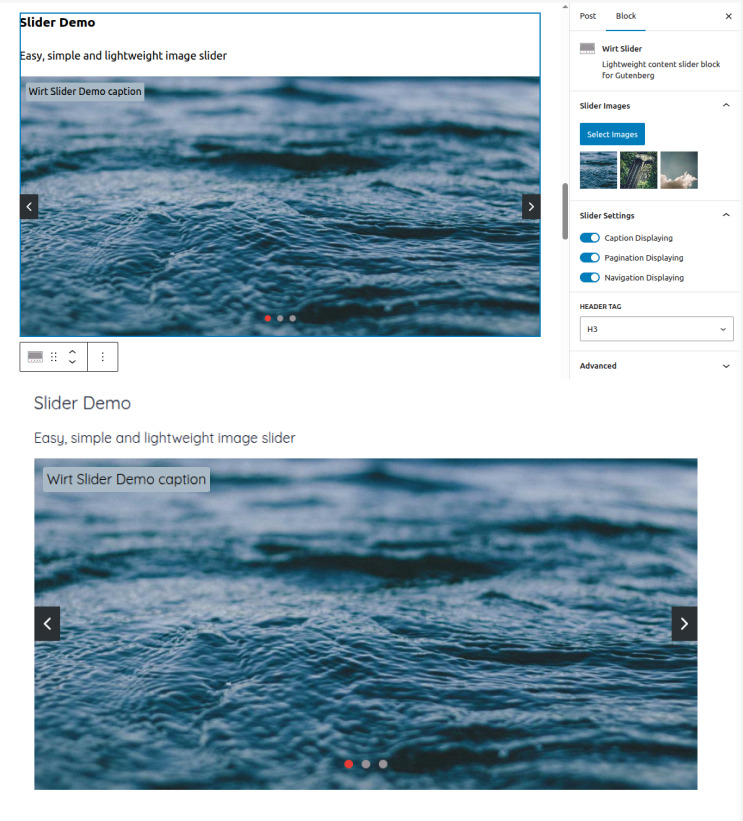
Its user-friendly interface allows you to insert slides, add headings, descriptions, and images with just a few clicks. You can control the display of navigation arrows and pagination dots, ensuring your slider looks exactly how you want on both desktop and mobile. Each slider is fully responsive, and you can even customize spacing, colors, and typography without touching any code.
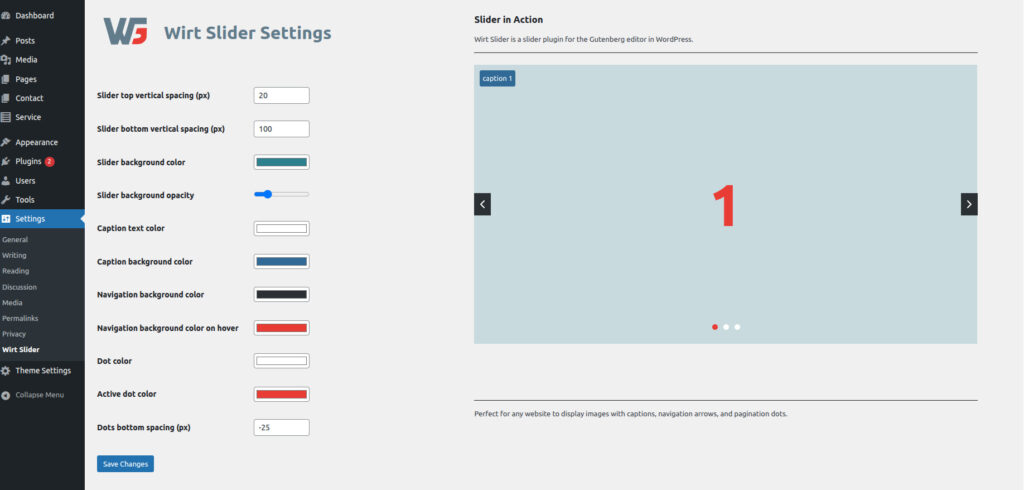
Wirt Slider is perfect for beginners, thanks to its intuitive block-based editor, and powerful enough for developers who want full control over slider styling and behavior. You can set global defaults for spacing, colors, navigation, and dots, or override these settings on individual sliders to create unique designs.
Why Choose Wirt Slider?
- Lightweight and Fast: Minimal JavaScript and CSS ensure your site stays quick and responsive.
- Easy Gutenberg Integration: No shortcodes or custom templates needed. Simply add the block and select your images.
- Responsive Design: Fully adapts to desktop, tablet, and mobile devices.
- Customizable Navigation: Control whether arrows, dots, or both are displayed.
- Simple Settings Panel: Adjust spacing, background colors, and slide behavior directly from the WordPress admin.
- Reusable Blocks: Each slider is independent, meaning you can have multiple sliders on the same page with different displaying navigation or pagination settings.
Wirt Slider is perfect for:
- Image galleries
- Featured posts or products
- Promotional content banners
- Portfolio showcases
- Reviews
- Blog articles
Get started in 4 steps:
- Add a Wirt Slider block in Gutenberg.
- Upload or select your images.
- Configure navigation, pagination displaying.
- Configure spacing and colors in general settings page. Done!
Slider Demo



Technical Details and Full Feature Guide
1. Gutenberg Integration
- Built as a custom Gutenberg block (
wirt/slider) that works out-of-the-box. - Supports multiple sliders per page, each with independent settings.
- Works with standard WordPress images and media library.
2. Slider Content
- Each slider can contain multiple images or content slides.
- Supports rich text headers and paragraphs per slide.
- Inline editing inside Gutenberg allows for real-time preview.
3. Navigation & Pagination
- Two toggles in the inspector controls: Display Navigation Arrows and Display Pagination Dots.
- Each slider can independently hide or show arrows/dots.
- Uses CSS variables (
--wirt-slider-nav-display,--wirt-slider-dots-display) for block-specific control.
4. Customizable Spacing & Styles
- Admin options to define:
- Top and bottom spacing (margins)
- Slider background color
- Navigation background colors (normal & hover)
- Dot colors (active & inactive)
- Dots bottom spacing
- All settings are inline styles applied per slider, allowing multiple sliders with different looks on the same page.
5. Lightweight Slider
- Powered by Keen Slider for smooth, performant animations.
- Supports looped slides, touch swipe, and desktop mouse drag.
- Autoplay can be configured via plugin settings (optional, can be enabled per slider).
6. React-Powered Editor Experience
- Fully functional inside Gutenberg editor.
- Inline updates: changing “Display Navigation” or “Display Pagination” immediately updates the editor preview.
- Custom inline styles allow each block to render exactly as it will appear on the front-end.
7. Performance Considerations
- No unnecessary libraries—only Keen Slider for animation.
- CSS and JS are enqueued only if a page contains the slider block.
- Inline styles avoid extra HTTP requests for per-slider settings.
8. How to Use
- Install Wirt Slider via your plugin dashboard.
- Add a “Wirt Slider” block to any post or page.
- Select images or content slides.
- Customize navigation, dots, and spacing in the block sidebar.
- Save and publish. Your slider is ready!
Bonus Tips:
- Each slider is independent—use one with navigation arrows for featured content, and another with only dots for a minimal gallery.
- CSS variables allow advanced users to override colors or spacing in their theme CSS if needed.
Summary
Wirt Slider is a lightweight, fast, and easy-to-use WordPress slider designed for both beginners and developers. Its block-based interface allows you to create responsive sliders with images, headings, and text effortlessly. You can control navigation arrows, pagination dots, spacing, and colors either globally or per slider.
Built on Keen Slider, it ensures minimal impact on page load times while offering full flexibility through CSS variables and inline styles. Every change, whether global or per-block, is immediately visible in the Gutenberg editor, making design and customization intuitive.
In short, Wirt Slider combines performance, simplicity, and versatility, making it the ideal solution for creating beautiful sliders on any WordPress site.