
My Honest Take on Elementor: Powerful Builder or Long-Term Trap?
Author: Rostyslav Wirt
Table of content:
Elementor has become one of the most widely used page builders in the WordPress ecosystem. Thousands of agencies, freelancers, and website owners rely on it to create websites quickly without deep coding knowledge.
At first glance, Elementor feels like a perfect solution. You drag elements, design layouts visually, and see the result instantly. For landing pages and marketing sites, this speed is extremely appealing.
But after working with WordPress projects for years, I’ve noticed something important. While Elementor is powerful and convenient, it also introduces several structural problems that can affect performance, scalability, and long-term stability.
This article is not meant to criticize Elementor blindly. It has real strengths. But it’s also important to understand the limitations before building large or long-term projects on top of it.
Let’s look at both sides.
The Biggest Advantage: Speed of Development
The main reason Elementor became popular is simple: it dramatically speeds up website creation.
Without writing code, you can build complex layouts using a visual interface. Headers, landing pages, hero sections, forms, galleries, animations — everything is available through drag-and-drop components.
For:
- marketing campaigns
- quick landing pages
- prototypes
- small business websites
Elementor can be extremely useful.
Instead of spending days writing HTML, CSS, and JavaScript, a designer or marketer can launch a page in hours. For many businesses, this speed is valuable.
However, convenience often comes with hidden costs.
Database Bloat: Elementor Stores a Huge Amount of Data
One of the most frequently discussed technical concerns about Elementor is how it stores information inside the WordPress database. Unlike a traditional WordPress page that mainly saves content inside the posts table, Elementor relies heavily on the postmeta table to store layout data, widget settings, styling rules, and responsive configurations.
In practice, this means that even a very small page can generate a surprisingly large number of database records.
To illustrate this, I ran a simple experiment on my local development environment.
I deployed a fresh WordPress installation on localhost and installed Elementor without adding any additional plugins or complex functionality. Then I created just one simple post using the Elementor editor. The content of that post was minimal: a short block of text and a single image placed using Elementor widgets.
From a user perspective, this page was extremely simple. It contained only basic content and no advanced styling or layout tricks.

However, after saving the post, I checked the database directly using phpMyAdmin and inspected the wp_postmeta table.
The result was surprising.
For this single post, the database contained more than 900 meta records associated with that page.
Each widget, spacing setting, responsive rule, and styling parameter generated additional metadata entries. Elementor stores a large amount of configuration data behind the scenes in order to preserve the flexibility of its visual editor.
In the screenshot below, you can see the result of this test directly in the postmeta table. Even though the page itself contains only a small amount of visible content, the database already holds hundreds of metadata entries generated by the builder.
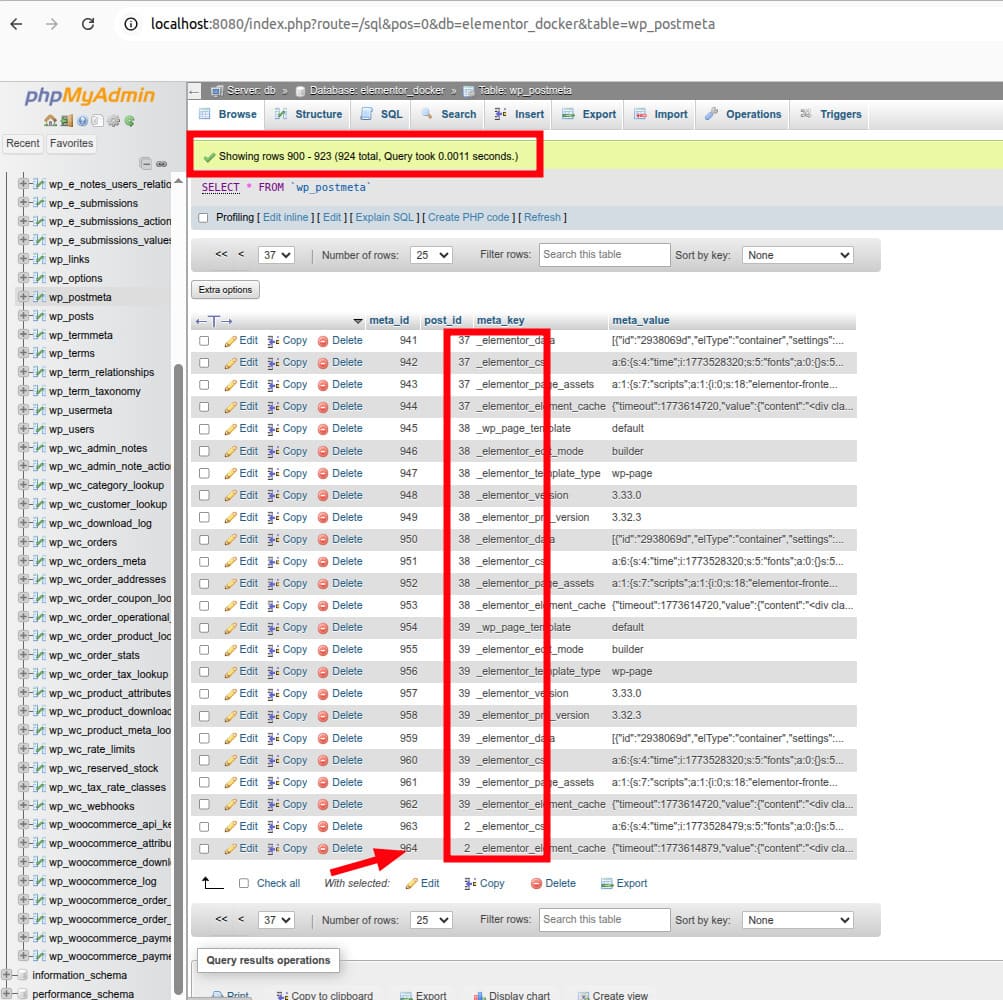
This experiment demonstrates an important architectural detail. Elementor prioritizes flexibility and visual editing capabilities, but the cost of that flexibility is a significantly larger database footprint.
On a small website with only a handful of pages, this may not cause noticeable issues. But on larger projects with dozens or hundreds of pages built with Elementor, the postmeta table can grow rapidly. Over time, this may lead to slower database queries, heavier backups, and increased server resource usage.
For developers responsible for maintaining performance and scalability, this is an important factor to consider when choosing the right tools for a long-term project.
Elementor and the Scalability Problem
Another issue is scalability.
Elementor sites are often difficult to scale efficiently as traffic grows.
Because the builder generates complex DOM structures and relies heavily on scripts and styles, pages tend to become heavier than hand-coded layouts.
This leads to:
- slower page rendering
- increased server load
- more aggressive caching requirements
When a project grows from a small marketing site into a high-traffic platform, Elementor can become a bottleneck.
At that stage developers often need to refactor large parts of the site or replace builder-generated layouts with optimized templates.
In other words, Elementor works well for quick builds, but it may not be ideal for long-term scalable architecture.
The Illusion That Anyone Can Build a Website
Elementor marketing often promotes the idea that anyone can build a professional website without developers.
In reality, this is only partially true.
Yes, you can assemble blocks and sections easily. But creating a well-designed, consistent, and user-friendly website still requires professional design knowledge.
Typography, spacing, layout hierarchy, accessibility, and responsiveness are not solved by a visual editor alone.
Because of this, many Elementor sites end up looking messy or inconsistent when built without experienced designers.
So in practice, Elementor does not eliminate the need for professionals. It simply changes the tools they use.
A skilled designer is still necessary to create a high-quality interface.
Layout and SEO Optimization Challenges
Another common issue is markup quality.
Elementor generates complex nested HTML structures to support its flexible visual system. While this approach works from a functional perspective, it rarely produces markup that is as clean or efficient as a layout written by hand.
To demonstrate this, I inspected the HTML output of a very simple Elementor block: a single image widget. From the user’s perspective, this element is extremely basic. It is just an image placed inside a section with default settings.
However, when viewing the page source in the browser’s developer tools, the structure becomes much more complicated than expected.
Instead of rendering a simple <img> element inside a minimal container, Elementor wraps the image inside multiple nested <div> elements. In my test case, displaying one image resulted in four additional wrapper divs before the actual image tag appears.
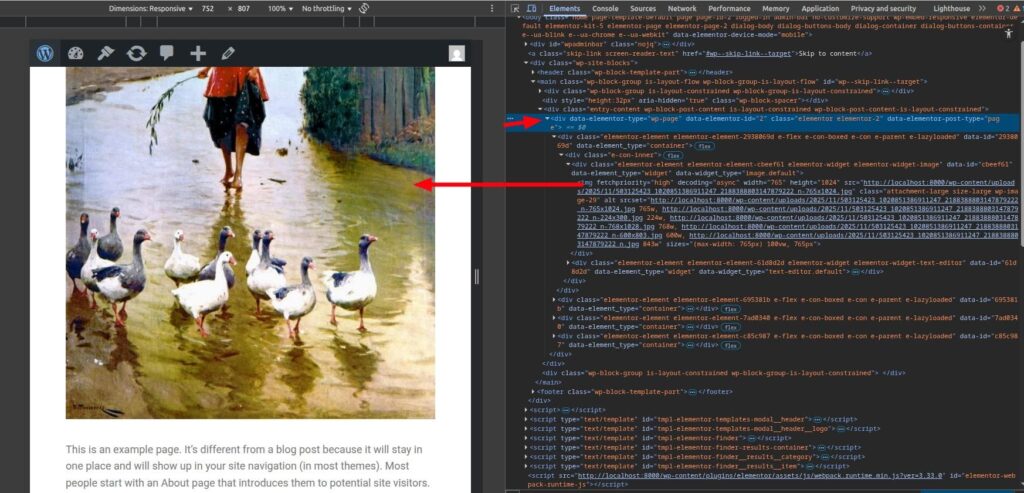
This layered structure is part of how Elementor handles layout controls, responsiveness, spacing, and visual editing capabilities. Each wrapper often exists to manage styling options such as alignment, margins, positioning, or responsive behavior.
While this architecture allows Elementor to offer a flexible drag-and-drop interface, it also introduces several technical downsides.
First, the DOM becomes deeper and more complex than necessary. A simple element that could normally be rendered in one or two HTML nodes may instead require five or more.
Second, this extra markup increases the overall size of the page HTML. When multiplied across dozens of widgets on a page, the result can be hundreds of additional elements that the browser must process.
Third, a large and deeply nested DOM structure can negatively affect rendering performance. Modern browsers are powerful, but parsing large HTML trees still takes time, especially on mobile devices.
From an SEO and performance perspective, this is not ideal. Search engines increasingly evaluate user experience metrics such as Largest Contentful Paint (LCP) and Interaction to Next Paint (INP). Heavier DOM structures can make these metrics harder to optimize.
Another practical consequence is more complicated debugging. When developers inspect Elementor-generated pages in Chrome DevTools, navigating through many layers of wrappers can make it harder to identify the element that actually controls the visual behavior.
Again, this does not mean Elementor is broken. The system is designed this way to support a highly flexible visual editor that works for non-developers.
But the trade-off is clear: the convenience of visual editing often comes at the cost of cleaner, lighter, and more efficient markup that could otherwise be achieved with custom development.
So, all this can lead to several problems:
- excessive DOM depth
- unnecessary wrapper elements
- slower rendering
From an SEO perspective, performance matters. Search engines evaluate loading speed, Core Web Vitals, and page structure.
Many Elementor sites struggle in tools like:
- Google PageSpeed Insights
- Lighthouse
- Chrome DevTools
It’s also common to see multiple warnings or errors in the browser console, especially when several plugins interact with Elementor scripts.
These issues don’t automatically destroy SEO, but they make optimization harder.
Plugin Compatibility After Updates
WordPress ecosystems rely heavily on plugins. Unfortunately, Elementor updates sometimes introduce compatibility issues.
After major updates, it’s not uncommon to see:
- layout breaks
- widget errors
- JavaScript conflicts
- styling problems
When Elementor interacts with other plugins, even small changes can cause unexpected behavior.
For developers managing multiple client sites, this becomes a real maintenance challenge. Updates must be tested carefully to avoid breaking production websites.
The Hidden Problem of Revisions
Another technical detail that many users overlook is WordPress revisions.
Every time a page is edited, WordPress stores a revision in the database. When Elementor pages are involved, those revisions can be quite large because they contain complex serialized data.
If revisions are not cleaned regularly, the database can grow rapidly.
Over time this may lead to:
- increased memory usage
- slower database performance
- hitting server memory limits
In extreme cases, websites begin returning 500 server errors because the hosting environment can’t handle the accumulated data.
Many site owners only discover this problem after performance degrades significantly.
The Final Reality: Rebuilding the Site
Here is something that happens surprisingly often.
A company launches a website using Elementor. At first everything works fine. The site looks good, pages are easy to edit, and the project launches quickly.
But after a few years the situation changes.
Traffic increases. Performance issues appear. Plugin conflicts accumulate. Database size grows.
Eventually the team decides they need something more reliable and scalable.
At that point they start searching for an experienced developer again — not to improve the Elementor site, but to rebuild it properly using optimized code and lightweight architecture.
In other words, the project migrates from a page builder to a custom solution.
This does not mean Elementor failed completely. It served its purpose for rapid development.
But it also means the initial assumption that “no developer is needed” often turns out to be temporary.
When Elementor Actually Makes Sense
Despite the criticism, Elementor is still a valuable tool in the right situations.
It works well for:
- landing pages
- marketing websites
- quick MVP projects
- small business sites
- temporary campaign pages
When speed is more important than long-term scalability, Elementor can be a practical solution.
But for large platforms, complex web applications, or projects expected to grow significantly, a custom approach is usually more sustainable.
Final Thoughts
Elementor is neither a miracle solution nor a terrible tool. It sits somewhere in the middle.
It offers incredible speed and convenience for building websites visually. That is why millions of users rely on it.
At the same time, it introduces technical trade-offs: database growth, scalability limits, messy markup, compatibility risks, and maintenance challenges.
Understanding these trade-offs is crucial before choosing Elementor as the foundation of a project.
Sometimes the fastest way to build a site today may also be the reason it needs to be rebuilt tomorrow.
And in many cases, the journey eventually leads back to the same place: a well-designed, lightweight website created with the help of experienced developers.